Meter, accents and sounds
Use this page to set how each bar sounds. Most of these settings need the unlock.
| Setting | Free | With the unlock |
|---|---|---|
| Time signature | 2/4, 3/4, 4/4 and 6/8 | All others, from 1 to 16 beats |
| Compound feel | 6/8 in two | All others |
| Groupings | No | Yes |
| Accents | The default pattern of each time signature | An accent level for each beat |
| Subdivisions and swing | No | Yes |
| Click sound | The default click | Six sounds |
| Count-in sound | The default count-in sound | Five sounds (all except the click sound) |
To set the time signature
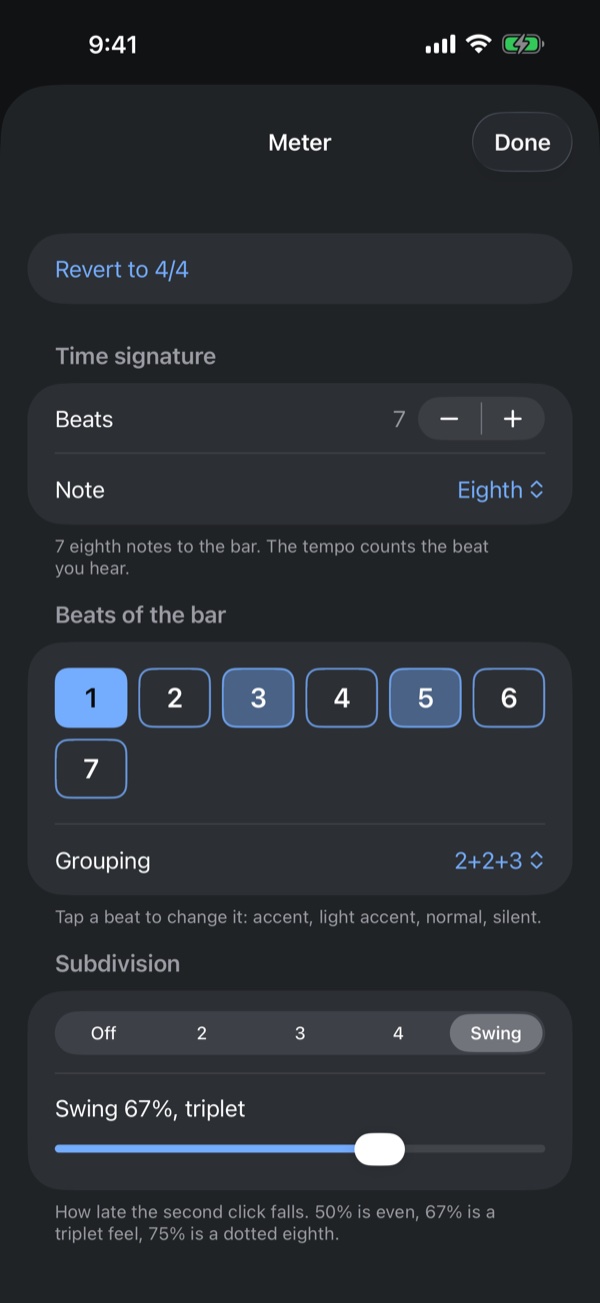
- On the main screen, tap the time signature. The Meter page opens.
- Select the number of beats in each bar, from 1 to 16.
- Select the note value: Half, Quarter, Eighth or Sixteenth.
Without the unlock, the Meter page shows keys for 2/4, 3/4, 4/4 and 6/8. The other time signatures need the unlock.
All the blocks in the ladder use the same time signature. You cannot give one block a different time signature.
The note value is only a label. At the same BPM, 7/8 and 7/4 sound the same.
Compound feel
In compound time, for example 6/8 or 12/8, you can count the large beats. In 6/8 in two, Gradus counts two beats in each bar. Each beat is three eighth notes.
To use 6/8 in two, open the Meter page. Under Feel, select In 2.
When you change to 6/8 in two, Gradus divides the tempo number by 3. For example, 90 BPM becomes 30 BPM. The bar keeps its length.
To use 6/8 in two, each block must be 90 BPM or faster. If a block is slower, Gradus does not do the change.
Groupings
If a bar has 5 beats or more, you can select a grouping. For example, 7/8 can be 2+2+3, 2+3+2 or 3+2+2. The grouping sets the accents of the bar.
When 6/8 is counted in two, there are no groupings.
Accents
- Open the Meter page.
- Tap a beat. Each tap changes the beat to the next level: accent, light accent, normal, silent.
Subdivisions and swing
Gradus can play 2, 3 or 4 clicks on each beat. It can also play a swing subdivision, from 50 to 75 percent.
- Open the Meter page.
- Under Subdivision, select 2, 3, 4 or Swing.
- For swing, set the percentage with the slider.
Click sounds
Gradus has six click sounds: Woodblock, Rim / Clave, Soft tick, Digital blip, Cowbell and Pitched click.
- Open Settings.
- In Sounds, tap Click sound and select a sound.
- Tap Count-in sound and select a sound.
The click sound and the count-in sound cannot be the same. Thus, you can hear the count-in bar.
Gradus has no volume control. Use the volume buttons of your iPhone.
Free or paid: 2/4, 3/4, 4/4, 6/8, 6/8 in two, the default accents and the default sounds are free. All other settings on this page need the unlock.
Related: Count-in · Unlock and Restore Purchases