Get started with Gradus
Use this page to play your first ladder and to learn the main screen.
What a ladder is
A ladder is a list of tempo blocks. Each block has a tempo and a length. Gradus plays the blocks in order. When one block ends, the next block starts at its own tempo. Thus, you do not have to stop and change the metronome by hand.
The main screen
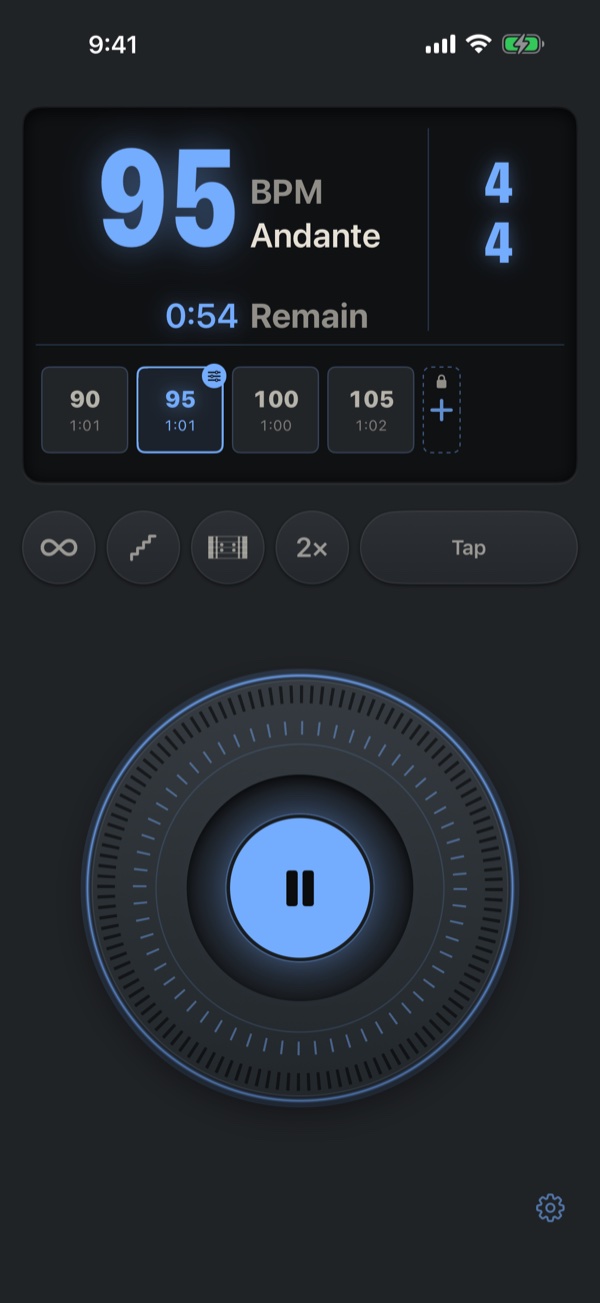
The main screen shows these items:
- The tempo of the selected block, as a large number.
- The time signature, at the right of the tempo.
- The ladder, with one block for each tempo. The selected block has a frame. While Gradus plays, the block that plays is lit.
- A row of keys: Infinite, Stepping, Repeat, 2× and Tap.
- The dial, with the Play button at its center.
- The Settings button, with a gear symbol, at the bottom right.
The starter ladder
When you open Gradus for the first time, it has a ladder of four blocks: 90, 95, 100 and 105 BPM. Each block is 1:00 long. You can play it immediately, or you can change it.
Repeat is off in the starter ladder. Thus, Gradus plays the ladder one time and then stops. For more information, see Repeat, Infinite and 2x.
Gradus keeps one ladder. It saves each change automatically, so your ladder is there when you open Gradus again.
To play the ladder
- Tap a block to select it.
- Tap Play. Gradus starts at the selected block.
- To pause, tap the button again. While Gradus plays, the button shows a pause symbol.
- To stop, touch and hold the button for approximately 1 second. Gradus stops and selects the first block.
Gradus plays a count-in first. You can turn off this count-in in Settings. For more information, see Count-in.
Gestures
Some actions use a gesture. The tips card in the app also shows these gestures.
| To do this | Do this |
|---|---|
| Edit a block | Double-tap the block |
| Type a tempo | Touch and hold the tempo number |
| Move a block | Touch and hold the block, then drag it sideways |
| Delete a block | Touch and hold the block, then drag it up. Then tap Delete. |
| Stop and go back to the first block | Touch and hold Play |
Practice with other audio
Gradus continues to play when you open a different app. It also plays when your iPhone is in silent mode. You can play it together with a backing track or a recorded lesson.
If a phone call starts, or if you disconnect your headphones, the click stops. Gradus does not change to the iPhone speaker.
Gradus does not need an account. It needs an internet connection only to buy or restore the unlock. Your ladder stays on your iPhone.
Free or paid: everything on this page is free.
Related: Blocks: tempo and length · Count-in